


sudo dpkg -i geonetmon_1.0.3_all.debThe package installs dependencies, creates the geonetmon system group, adds your user to it, and starts the background daemon. Log out and back in after install, then launch from your application menu or run geonetmon.
New in 1.0.3: passive DNS capture (real hostnames for CDN IPs with the shield off), optional app-lock password with idle auto-lock, 14 new themes ported from Tesseract, a native system-tray menu that works on GTK4, grouped past connections, and a stack of smaller fixes (toggle-button theming, Escape closes dialogs, window size persistence, owner-only permissions on config/history files).
GeoNetMon is a GTK4 network monitor and interactive firewall for Linux. It has two modes:
Monitor mode (shield off) — a passive live view of every TCP and UDP connection on the machine. No packets are intercepted. Process name, destination country, organisation, reverse hostname, bandwidth, and risk score are shown per connection. This mode works without the daemon and without root.
Enforcement mode (shield on) — outbound connections are held in the kernel queue before they go through. A prompt window asks you to allow or deny, exactly like Little Snitch or OpenSnitch. Rules you create persist and auto-apply to future connections so you only see a prompt once per app (or per host/port, depending on how you configure it).
The GUI runs as your normal user in both modes. A small privileged daemon (geonetmond) handles packet interception via nftables and NFQUEUE and publishes process names to a world-readable file — the GUI never needs root.
Tip
GeoNetMon works well alongside a traditional firewall. Use GeoNetMon for real-time interactive decisions — allow or deny a specific app's connection the moment it happens — and your firewall for persistent blanket rules (block a port, restrict a range). GeoNetMon supports UFW, nftables, and iptables as backends for its manual IP block feature. UFW is recommended for most users as blocks are written as proper UFW rules and survive reboots; nftables and iptables blocks are re-applied from GeoNetMon's own record on each change.
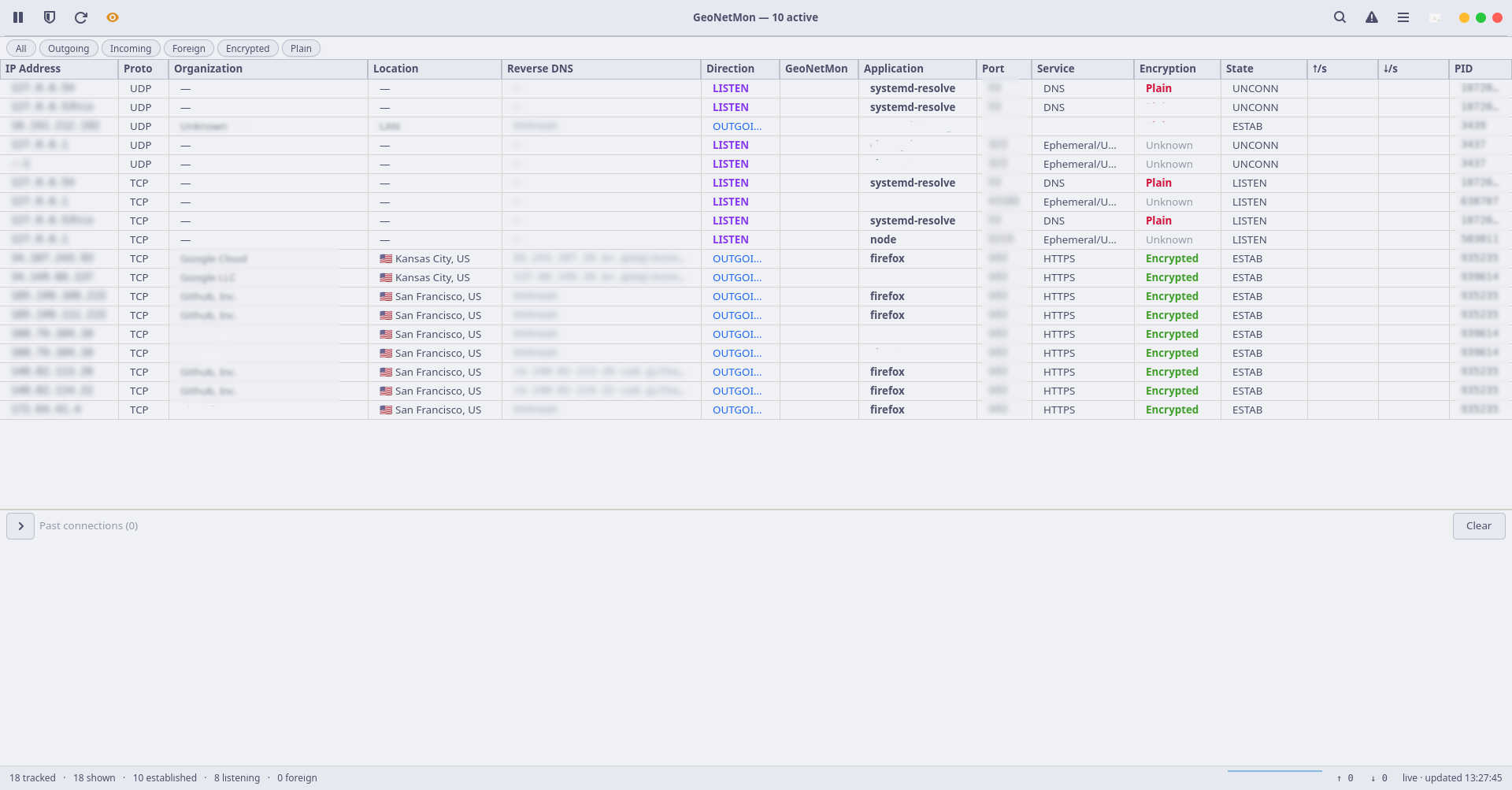 Overview — light mode |
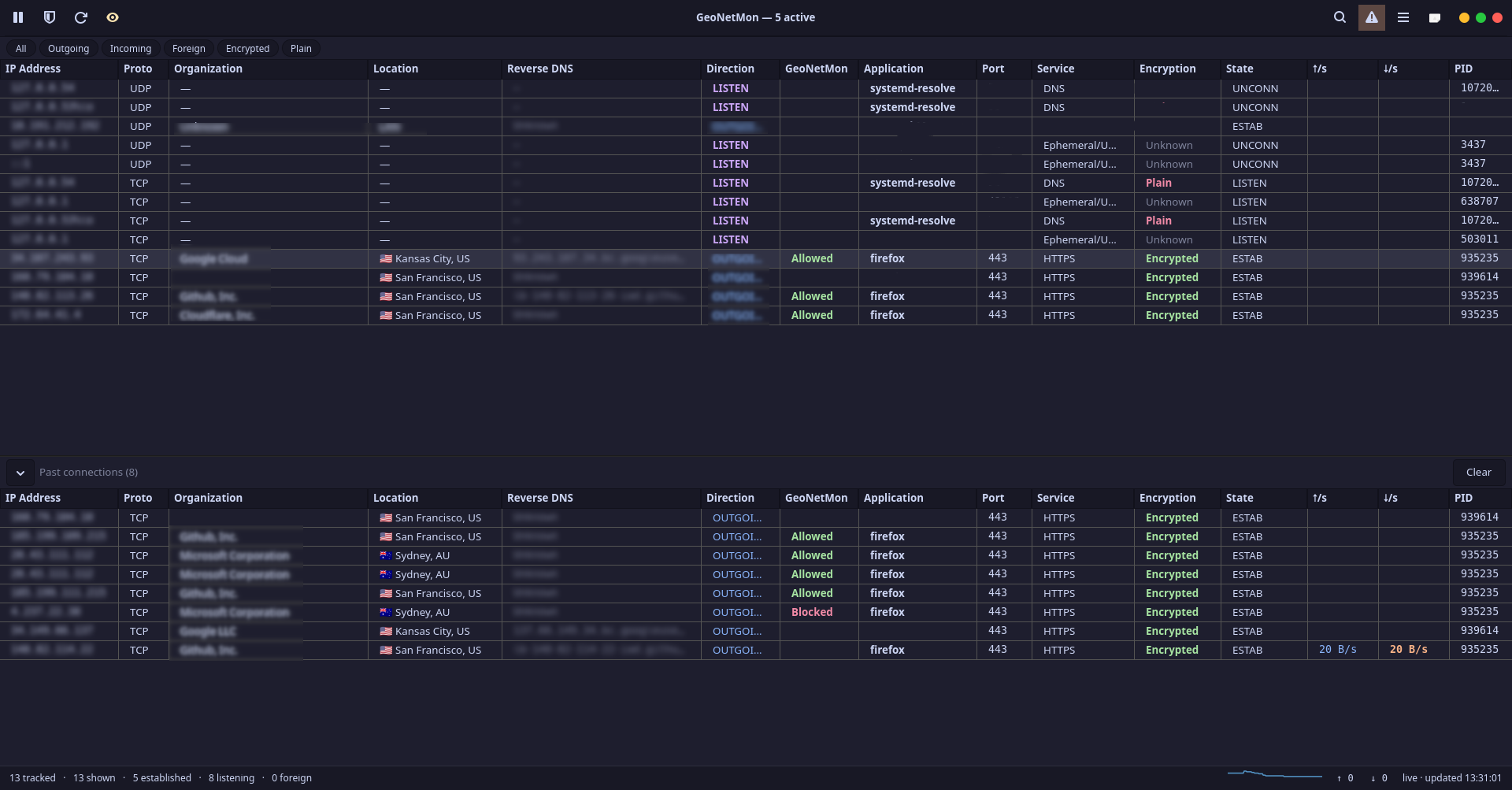 Overview — dark mode with past connections |
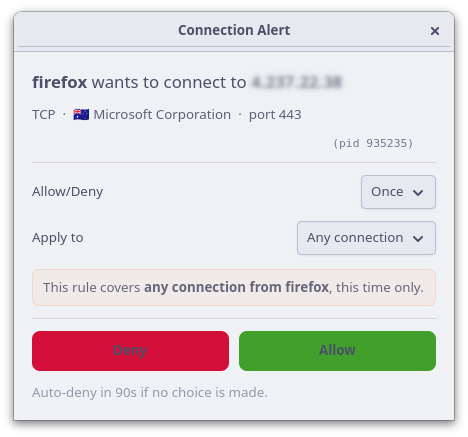 Allow / deny prompt |
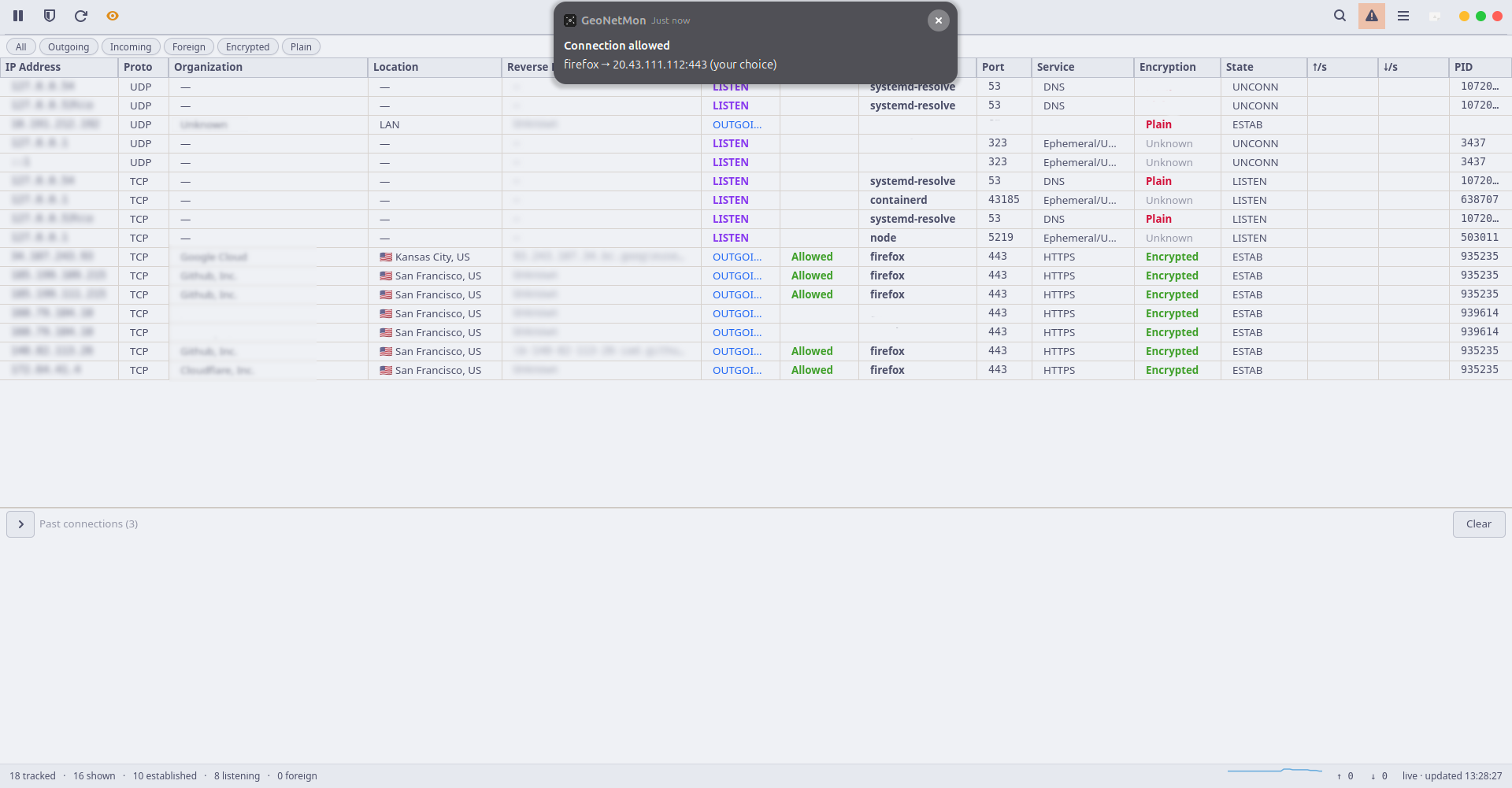 Connection allowed — GNOME notification |
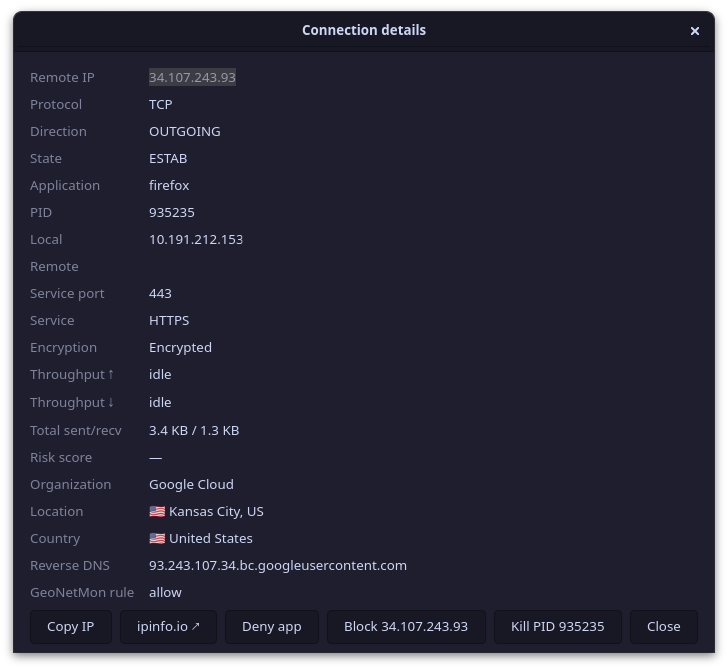 Connection details |
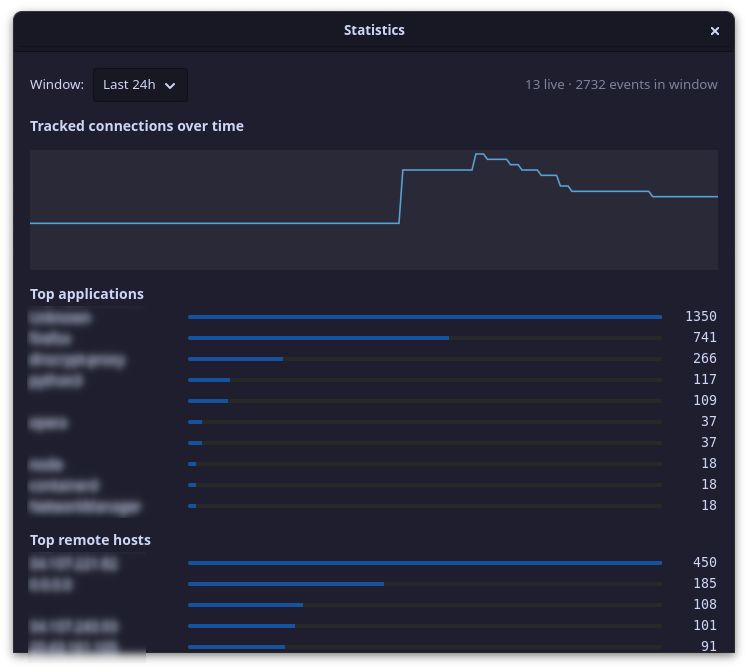 Statistics |
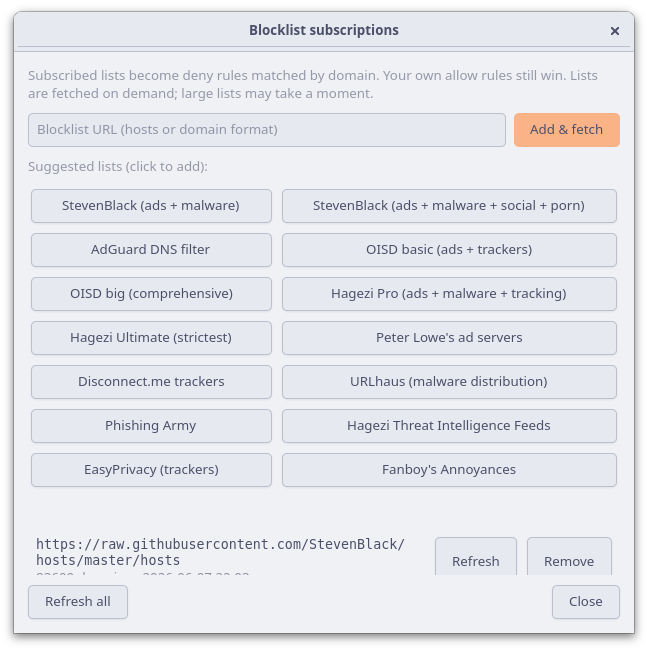 Blocklist subscriptions |
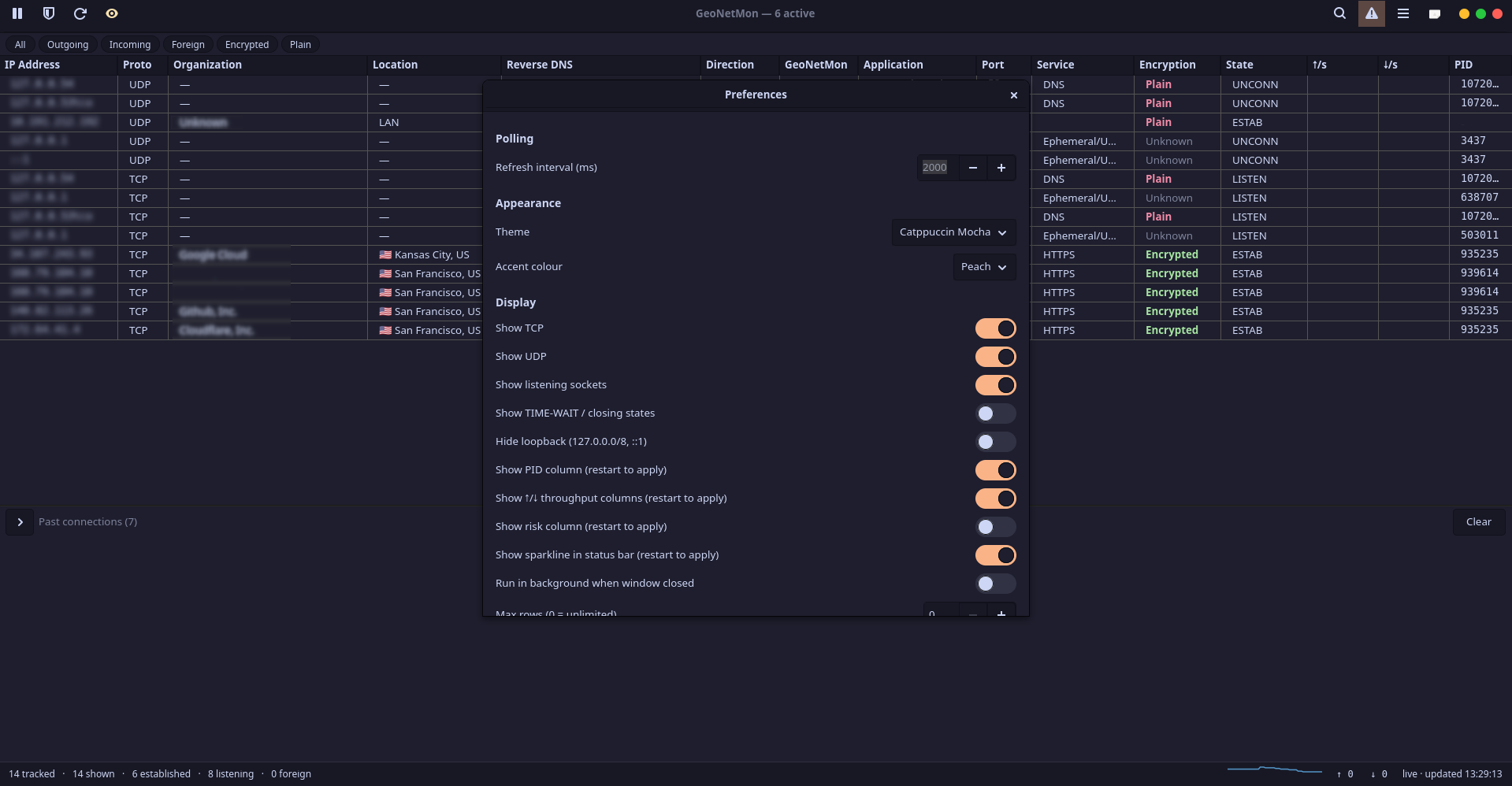 Preferences — appearance |
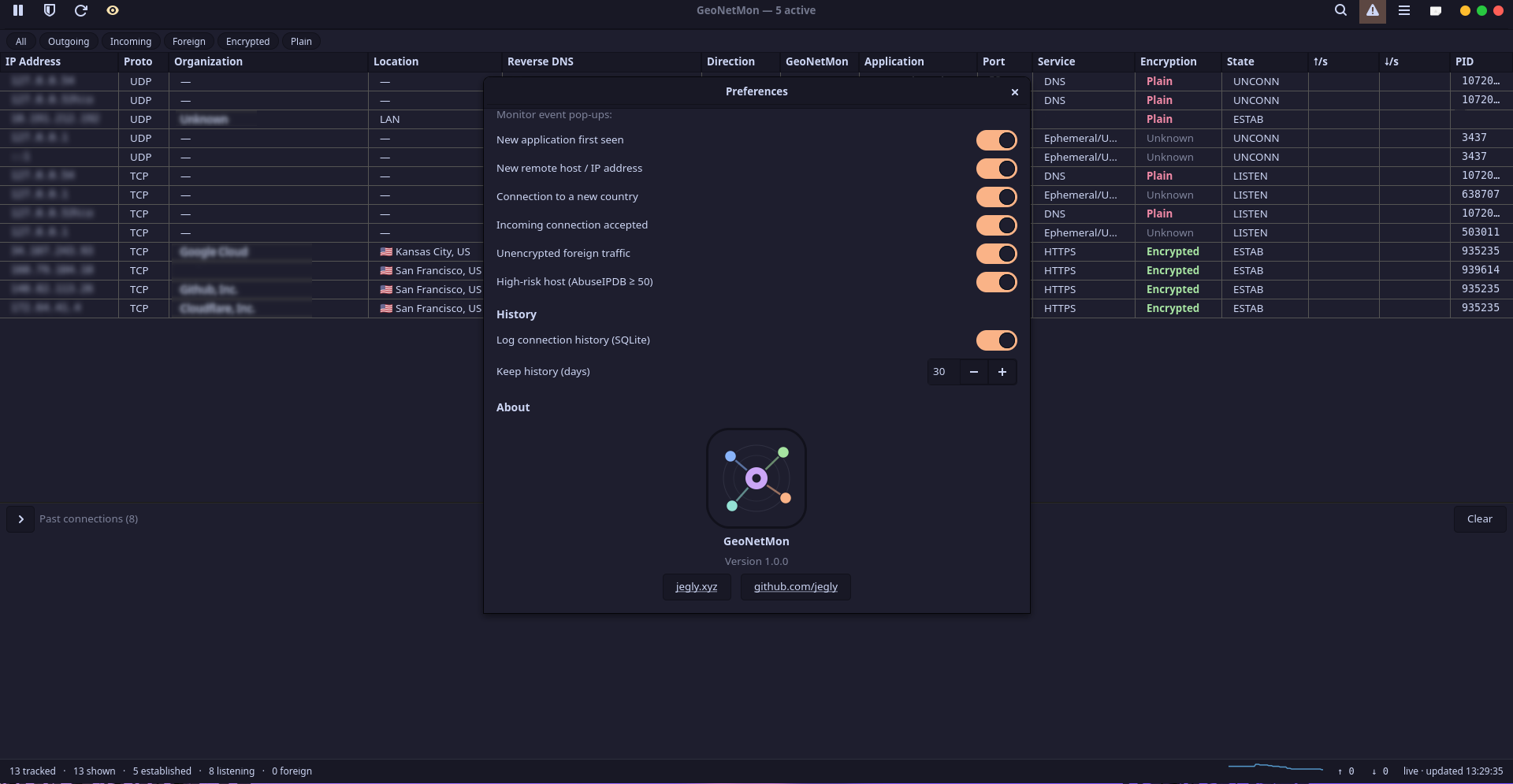 Preferences — alerts and history |
All active TCP and UDP sockets, refreshed on a configurable interval. Each row shows:
- Process name and PID
- Local and remote address
- Destination hostname (reverse DNS)
- Country and organisation (GeoIP)
- Country flag
- Protocol and port service name
- Direction (outbound / incoming / listening)
- Encryption status
- Live upload and download rate
- Risk score (AbuseIPDB — requires API key)
- Enforcement verdict (allowed / blocked / pending)
- Connection state
Columns are individually toggleable. New connections flash briefly on arrival. A search bar and quick-filter pills (TCP, UDP, outgoing, incoming, listening) let you narrow the table in real time. The status bar shows live aggregate throughput and a sparkline of connection count over time.
| Monitor (shield off) | Enforcement (shield on) | |
|---|---|---|
| Daemon required | No — degrades gracefully | Yes |
| Packets intercepted | No | Yes — held until you decide |
| Rules applied | No | Yes |
| Process names visible | Yes (via /run/geonetmon-procs.json) |
Yes |
| Works without root | Yes | Yes (daemon runs as root, GUI does not) |
Switching the shield on without the daemon running shows a status message and leaves the app in monitor mode.
Outbound connections are held in the kernel queue until you respond. A prompt window appears with the process name, destination, country, and port. If the window is minimised or behind another window, a GNOME desktop notification fires — clicking it raises the prompt directly, with no lag.
How long the rule lasts:
| Scope | Meaning |
|---|---|
| Once | This connection only — not saved |
| Until the app quits | Active while the process is running |
| Until restart | Survives app restarts, cleared on reboot |
| Forever | Written to disk, applied automatically from then on |
What the rule covers:
| Apply to | Meaning |
|---|---|
| Any connection | Any outbound connection from this app |
| Connections to this host | This app to this destination only |
| Connections on this port | This app on this port, any host |
| Only this connection | Exact — this app, this host, this port |
A plain-English summary under the dropdowns describes the exact rule before you confirm. An auto-timeout acts if you don't answer — the action (allow or deny) and duration are configurable.
The daemon watches DNS responses on every interface (a receive-only socket with a kernel BPF filter — only port-53 packets ever reach userspace) and remembers which hostname resolved to which IP. This works with the shield off, so CDN and cloud IPs that publish no reverse-DNS record still show the name your machine actually looked up — firefox → github.com instead of a bare Fastly IP. Local resolvers like dnscrypt-proxy and systemd-resolved are covered too: the app↔127.0.0.1:53 leg is plaintext even when the upstream is encrypted.
The hostname map lives in daemon memory only (capped, 15-minute TTL, never written to disk) and is served to the GUI over the existing group-gated socket. Toggle under Preferences → Enrichment.
The same capture feeds enforcement prompts, so they say firefox → github.com on the very first packet, not a bare IP. Blind spot: an app doing its own DNS-over-HTTPS internally (bypassing the system resolver) is invisible — same limitation as Little Snitch.
When you allow an application, its executable is SHA-256-pinned. If that binary changes later, the prompt flags it — a replaced binary cannot inherit an existing allow rule.
Separate from enforcement. Right-click any row in the connection table and choose Block IP to immediately drop all traffic to and from that remote address. The block goes through whichever firewall backend is configured in Settings (ufw, nftables, or iptables — auto-detected by default). UFW blocks survive reboots; nftables blocks are re-applied declaratively from GeoNetMon's own record. Blocked IPs are listed and removable from the Firewall manager.
Right-clicking any connection row opens a context menu with:
- Allow / Deny — create a quick permanent rule for this connection without going through the full prompt
- Details / lsof — open the full detail window with process info
- Copy IP — copy the remote address to the clipboard
- Filter to this app — narrow the table to show only connections from this process
- Block / Unblock IP — immediate firewall block on the remote IP
- Whois — open an in-app whois lookup for the remote IP
- Kill process — send SIGTERM to the owning process
Notifications for allow/deny prompts appear at the desktop level — visible even when the app is minimised or behind other windows. Clicking the notification raises only the small prompt window directly. Notification behaviour for manual decisions, auto-allowed connections, and auto-denied connections are each independently toggled in Settings.
GNOME desktop notifications and an in-app alert log for:
- A new application making its first outbound connection
- A connection to a new country
- A connection flagged high-risk by AbuseIPDB
- Incoming connections
- Unencrypted connections to foreign hosts
Each alert type is individually toggled in Settings.
Subscribe to domain blocklists in hosts or plain-domain format. Subscribed domains become deny rules matched before any outbound connection is allowed. Your own allow rules always take priority.
Fourteen presets included:
| Category | Lists |
|---|---|
| Ads and tracking | StevenBlack, AdGuard DNS, OISD basic, OISD big, Hagezi Pro, Hagezi Ultimate, Peter Lowe, Disconnect.me, EasyPrivacy, Fanboy Annoyances |
| Malware and phishing | URLhaus, Phishing Army, Hagezi Threat Intelligence Feeds |
| Combined | StevenBlack (ads + malware + social + explicit) |
Any hosts-format or plain-domain URL can be added.
A rules table for viewing, adding, editing, and deleting named allow/deny rules. Rules can target a process binary, destination host, destination port, or any combination. Specificity ordering is automatic — more specific rules win over broader ones. Rules persist to ~/.config/geonetmon/rules.json and can be exported and imported as JSON.
A collapsible in-session panel below the live table shows connections that appeared and then closed during the current session. Repeats of the same connection (same IP, port, protocol, app — think dnscrypt-proxy probing its resolvers every few seconds) coalesce into a single row with a ×N count and an expander arrow that reveals every individual instance. Double-click any entry for full detail. The list can be cleared manually and does not persist across restarts (connection history is in the History tab instead).
An equirectangular map with great-circle arcs from your location to each geolocated remote, coloured by direction, foreign, or high-risk status. A CC0 coastline is bundled — no network calls or extra assets required. Set your home country in Settings to place the origin marker.
Top applications, remote hosts, and countries over a selectable window (hour / day / week / month), plus an activity graph, all from the local history database.
Past connections logged to a local SQLite database. Retention defaults to 30 days.
Two backends:
- GeoLite2 (offline) — point the app at a local
GeoLite2-City.mmdband optionallyGeoLite2-ASN.mmdb. No internet required after download. Preferred when configured. - ipinfo.io (online) — optional API token for higher rate limits.
Both backends cache results locally for 7 days. Private, loopback, and link-local IPs are resolved locally and never sent to any external service.
The Export option in the menu saves all currently visible rows to a CSV file, including every column.
A pause button in the header stops the table from refreshing without closing the app. Useful when inspecting a specific connection without the list moving under you.
Twenty themes, switchable live in Settings with no restart: System (follows your GTK dark/light setting), Dracula, all four Catppuccin flavours (Latte, Frappé, Macchiato, Mocha), plus fourteen ported from Tesseract — Adventure Time, Borland, Commodore 64, Fairy Floss Dark, Flat, Gogh — Starry Night, Grass, Gruvbox Material, Homebrew, Kokuban, Mono Cyan, Neon Tessera, Ocean, and Vintage Light. All support configurable accent colours.
An optional password gate on the GUI (Preferences → Security). When enabled, the window opens to a lock screen; there's a "Lock now" menu item, and an idle timer can re-lock automatically after N minutes. The password is stored as a salted PBKDF2 hash — this guards casual access to the UI only, it does not encrypt anything on disk.
A native system-tray icon (monochrome symbolic, matches your panel) with a right-click menu: Show, Pause monitoring, Enforcement toggle, Lock now, and Quit — checkmarks stay in sync with the app. Implemented directly over D-Bus (StatusNotifierItem + DBusMenu), so it needs no extra packages and works in the GTK4 process — anywhere a StatusNotifier host exists (KDE, GNOME with the AppIndicator extension enabled — default on Ubuntu, XFCE, …). When enforcement is armed the icon gains a shield overlay. Pairs with "Run in background when window closed" so closing the window keeps monitoring alive in the tray.
- Window size and maximized state are remembered across restarts
- Every dialog closes on Escape
- Export the alert log to CSV from the menu
- "Start on login" toggle (XDG autostart) in Preferences
- Reset the "first seen" memory to re-prime new-app/new-country alerts
- AbuseIPDB and ipinfo.io open-in-browser buttons in the detail dialog
- Config, history, and cache files are written owner-only (0600) — API tokens and connection history are not readable by other local users
geonetmond  (root daemon, systemd service)
  ├── nftables NFQUEUE hook — holds outbound packets pending a decision
  ├── procmap — resolves PIDs via /proc/net/tcp and /proc/net/udp socket inodes
  ├── passive DNS sniffer — AF_PACKET + kernel BPF filter, always on,
  │     feeds ip→hostname to prompts AND the monitor view (memory-only)
  ├── publishes process names → /run/geonetmon-procs.json  (world-readable)
  └── Unix socket /run/geonetmon.sock  (NDJSON, group geonetmon, mode 0660)

geonetmon  (GUI, unprivileged, geonetmon group required for enforcement)
  ├── reads /run/geonetmon-procs.json for process names without needing root
  ├── connects to /run/geonetmon.sock to send allow/deny verdicts
  └── GeoIP enrichment, rDNS, bandwidth tracking, rule evaluation, UI
If the daemon is not running, the GUI starts in monitor mode automatically — all passive features work, enforcement is unavailable.
sudo dpkg -i geonetmon_<version>_all.debIf dpkg reports missing dependencies:
sudo apt install -fLog out and back in after install for group membership to take effect.
Required (installed automatically by the .deb):
| Package | Purpose |
|---|---|
python3 >= 3.10 |
Runtime |
python3-gi |
GTK bindings (PyGObject) |
python3-gi-cairo |
Cairo renderer |
gir1.2-gtk-4.0 |
GTK4 typelib |
iproute2 |
ss for socket enumeration |
Recommended (required for enforcement and offline GeoIP):
| Package | Purpose |
|---|---|
nftables |
Required for the allow/deny enforcement engine (NFQUEUE) |
python3-netfilterqueue |
NFQUEUE Python bindings (enforcement only) |
python3-maxminddb |
Offline GeoLite2 database support |
pkexec or policykit-1 |
Privilege escalation for daemon management |
ufw |
Optional backend for manual IP blocking |
Optional:
| Package | Purpose |
|---|---|
gir1.2-ayatanaappindicator3-0.1 |
Legacy tray fallback only — the native tray needs nothing extra |
The .deb postinst enables the daemon automatically. To manage it manually:
sudo systemctl start geonetmond
sudo systemctl enable geonetmond
Then click the shield button in the app header to begin intercepting connections.
- Download
GeoLite2-City.mmdb(and optionallyGeoLite2-ASN.mmdb) from MaxMind — free account required - Open Settings and set the path under GeoIP
| Key | Default | Description |
|---|---|---|
refresh_ms |
2000 | Connection table refresh interval in milliseconds |
paused_on_start |
false | Start with monitoring paused |
max_rows |
0 | Maximum rows in the live table (0 = unlimited) |
show_tcp / show_udp |
true | Show TCP / UDP connections |
show_listen |
true | Show listening sockets |
show_timewait |
false | Show TIME-WAIT and CLOSE-WAIT sockets |
hide_loopback |
false | Hide loopback connections |
resolve_geo |
true | Resolve country and organisation per connection |
resolve_rdns |
true | Resolve reverse hostnames |
dns_sniff |
true | Daemon-side passive DNS capture (hostnames without enforcement) |
ipinfo_token |
"" | ipinfo.io API token (optional, for higher rate limits) |
abuseipdb_token |
"" | AbuseIPDB API key (required for risk scoring) |
geoip_db_path |
"" | Path to local GeoLite2-City.mmdb |
geoip_asn_db_path |
"" | Path to local GeoLite2-ASN.mmdb |
home_country |
"" | Your two-letter country code — foreign connections are flagged |
cache_ttl_hours |
168 | GeoIP and rDNS cache lifetime in hours (default 7 days) |
firewall_backend |
auto | Backend for manual IP blocking: auto / ufw / nftables / iptables — does not affect the enforcement engine, which always uses nftables + NFQUEUE |
enforce_enabled |
false | Enable the interactive firewall |
enforce_default_action |
prompt | What to do with unmatched connections: prompt / allow / deny |
enforce_prompt_timeout_s |
90 | Seconds before auto-deciding if a prompt is not answered |
enforce_timeout_action |
deny | Action on prompt timeout: allow or deny |
enforce_default_scope |
forever | Default rule duration shown in prompts |
enforce_default_scope_by |
app_any | Default rule scope shown in prompts |
enforce_skip_dns |
true | Never prompt on DNS queries (port 53) |
enforce_skip_loopback |
true | Never enforce on loopback traffic |
enforce_fail_open |
true | Accept traffic if the enforcement engine dies |
enforce_notify_prompt |
true | GNOME notification when a prompt fires |
enforce_notify_allow |
true | GNOME notification on manual allow decisions |
enforce_notify_allow_auto |
false | GNOME notification on auto-allowed connections (existing rule matched) |
enforce_notify_deny |
true | GNOME notification on manual deny decisions |
enforce_notify_deny_auto |
false | GNOME notification on auto-denied connections (off by default to avoid spam) |
history_keep_days |
30 | Connection history retention in days |
highlight_seconds |
5 | How long new connection rows flash before settling |
theme |
system | UI theme: system / dracula / catppuccin-mocha / gruvbox-material / etc. |
accent |
"" | Accent colour override ("" = theme default) |
app_lock_enabled |
false | Require the app-lock password on launch |
app_lock_idle_min |
0 | Re-lock after N idle minutes (0 = off) |
run_in_background |
false | Keep running when the window is closed |
silent_mode |
false | Suppress all desktop notifications |
win_width / win_height / win_maximized |
— | Remembered window geometry |
Config is stored at ~/.config/geonetmon/config.json.
git clone https://github.com/jegly/GeoNetMon
cd GeoNetMon
bash packaging/build-deb.sh
sudo dpkg -i geonetmon_1.0.3_all.deb
Requires dpkg-deb and Python 3.10+ on the build machine. No compiled components — the package is pure Python.
| Component | Technology |
|---|---|
| GUI | Python 3, GTK4 (PyGObject) |
| Packet interception | nftables + NFQUEUE (python3-netfilterqueue) |
| Process resolution | /proc/net/tcp and /proc/net/udp socket inode scanning |
| GeoIP offline | MaxMind GeoLite2 (python3-maxminddb) |
| GeoIP online | ipinfo.io |
| Risk scoring | AbuseIPDB API |
| Manual IP blocking | ufw / nftables / iptables (auto-detected) |
| Rule storage | JSON (~/.config/geonetmon/rules.json) |
| Connection history | SQLite |
| IPC protocol | Unix socket, NDJSON |
| System integration | systemd, Gio.Notification (GNOME), native StatusNotifierItem + DBusMenu tray (Gio D-Bus) |
| Themes | Pure GTK4 CSS with @define-color palettes |
GPL 3.0